What makes this file tricky
For a long timelapse, manually applying an exposure change to hundreds of sidecars can take time. Interpolation fills the values between two settings you already chose.
Use the first and last exposure settings in a numbered Lightroom XMP sequence to produce a gradual exposure change between them.
Free preview US$8 per sidecar batch
Files stay on your device. No account needed.
XMPInput format
XMP ZIPOutput format
Local processingFiles stay in your browser
For a long timelapse, manually applying an exposure change to hundreds of sidecars can take time. Interpolation fills the values between two settings you already chose.
Uses one numbered sequence of 3 to 5,000 UTF-8 XMP files with Exposure2012 already present. Maximum 64 MiB combined. It adjusts one global exposure parameter. RAW, ACR and video rendering are outside the scope.
Open a numbered set of XMP sidecars or a ZIP of those files.
Enter the first and last frame numbers. Check the intermediate exposure in the preview.
Save the revised XMP ZIP, back up your current sidecars, and read the exported metadata in Lightroom.
Try a sample or open your own files. The preview runs in this browser.
Choose a file or try the sample to see the result here.
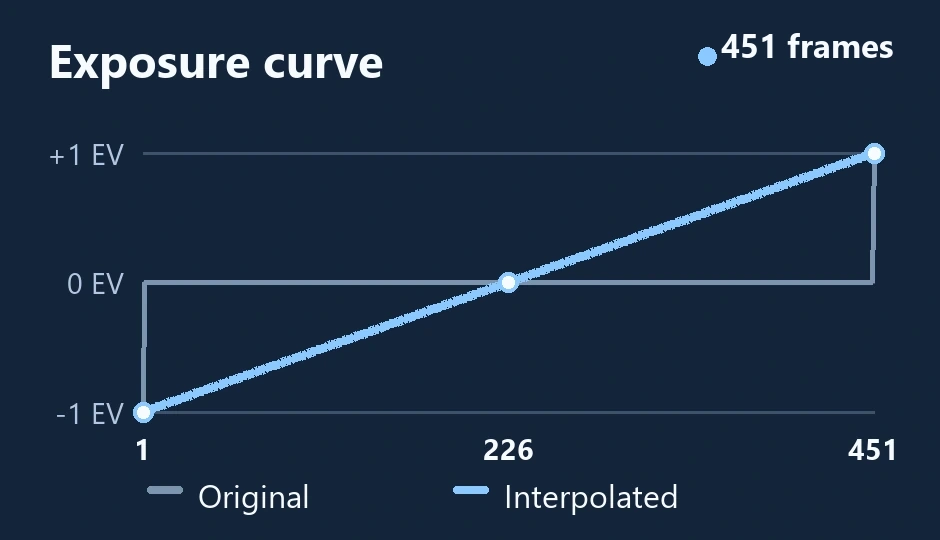
The sample has 451 generated sidecars with -1 EV and +1 EV as endpoints. The midpoint becomes 0 EV. Independently exported Lightroom fixtures also verified the matching Exposure2012 property.
| Tool | What it does |
|---|---|
| Exposure Bridge | The sample has 451 generated sidecars with -1 EV and +1 EV as endpoints. The midpoint becomes 0 EV. Independently exported Lightroom fixtures also verified the matching Exposure2012 property. |
| RAWBlend | Desktop timelapse interpolation tool with a limited free version. |
| LRTimelapse | Desktop suite with timelapse workflows and a 400-image limit on its free version. |
The links describe each alternative's documented workflow.
$0
Open a sample or your own files and inspect the result before deciding whether to export.
US$8 per sidecar batch
Pay once to download the full result shown in your preview.
Already paid? Restore your purchase.
Open XMP sidecars only. Processing happens in the browser.
It interpolates one global exposure setting between two manually chosen values.
Use one sequence with unique frame numbers at the end of each XMP name.
The two endpoints remain intact. The tool edits the intermediate Exposure2012 values.
The preview is free. Each sidecar batch is US$8, charged once at download.
Your files are processed in your browser. Stripe handles checkout separately.
No account is needed. Complete Stripe Checkout and return to this browser to download the result.
Open this tool in the same browser and select Restore purchase. Prepared exports are kept locally for up to seven days.
Follow the workflow and check the formats the tool supports.
See what stays in the browser and what Stripe receives at checkout.
Find out how to recover a purchase and which details to keep.
Open the tool and preview the result for free.